
When should you plan smart technology for a custom pool?
The best time to plan smart technology for a custom pool is during design, before excavation, because the equipment pad, plumbing, conduit and network coverage that make automation work are all easier to place correctly while the pool is still on paper. Adding smart features later is often possible, but planning them early gives you more options and fewer compromises.
Smart pool technology is not one product. It is a set of connected equipment, usually a control system tied to the pump, heater, lighting, spa, water features and sometimes the sanitation system, plus a way to reach it from a phone. What a given system can control or monitor varies, so the useful question is not “should I get automation?” but “what do I want the pool to do, and what does the design need to support it?”
Overview
This guide is for homeowners planning a new custom pool or a major remodel who want to understand how smart equipment fits into the design. It covers the systems that can be automated, equipment pad planning, conduit and Wi-Fi, efficiency features like variable-speed pumps, and why automation does not replace water testing. You will come away with a practical list of decisions to make with your pool designer.
What “Smart” Actually Means for a Pool
A smart pool connects its major equipment to a controller that you can operate and monitor remotely. Depending on the system, that can include scheduling the pump, setting heater temperatures, controlling lights, running a spa, switching water features, and receiving alerts when something needs attention.
Not every system has the same capabilities. Some control only a handful of devices, while others cover more equipment and offer deeper monitoring. When you compare options, ask what each system can control, what it can only monitor, and which equipment it is compatible with. For one common use case, see this post on controlling a pool heater and lights from your phone.
What Each System Can Do, and What to Plan For
The table below summarizes common pool systems and the planning notes that matter at the design stage. Capabilities vary by equipment and controller, so treat it as a list of questions rather than a feature promise.
| System | What it can control or monitor | Planning note |
|---|---|---|
| Pump and filtration | Speed settings, run schedules | Choose a pump that supports variable speeds; confirm the controller can command it |
| Heater | Temperature settings, scheduling | Size it to the pool and spa; plan fuel or power supply and venting early |
| Lighting | On and off, scenes, colors on compatible fixtures | Decide fixture locations in design and run conduit before finishes |
| Spa | Spa mode, jets, temperature | Plan valves and plumbing so the spa switches cleanly with the pool |
| Water features | Pumps and valves for waterfalls, scuppers, deck jets | Dedicated, correctly sized plumbing keeps features quiet and controllable |
| Sanitation | Salt system settings | Leave space on the pad for the salt cell and control unit |
| Monitoring and alerts | Equipment status, temperature, notifications on compatible systems | Needs reliable network coverage at the pad |
Start with the Equipment Pad
Everything in a smart pool runs through the equipment pad, so its size and location are the first decisions. A pad that is too small limits what you can add later. Think about service access, ventilation for the heater, noise toward bedrooms and neighbors, and room for the pump, filter, heater, controller and any sanitation equipment.
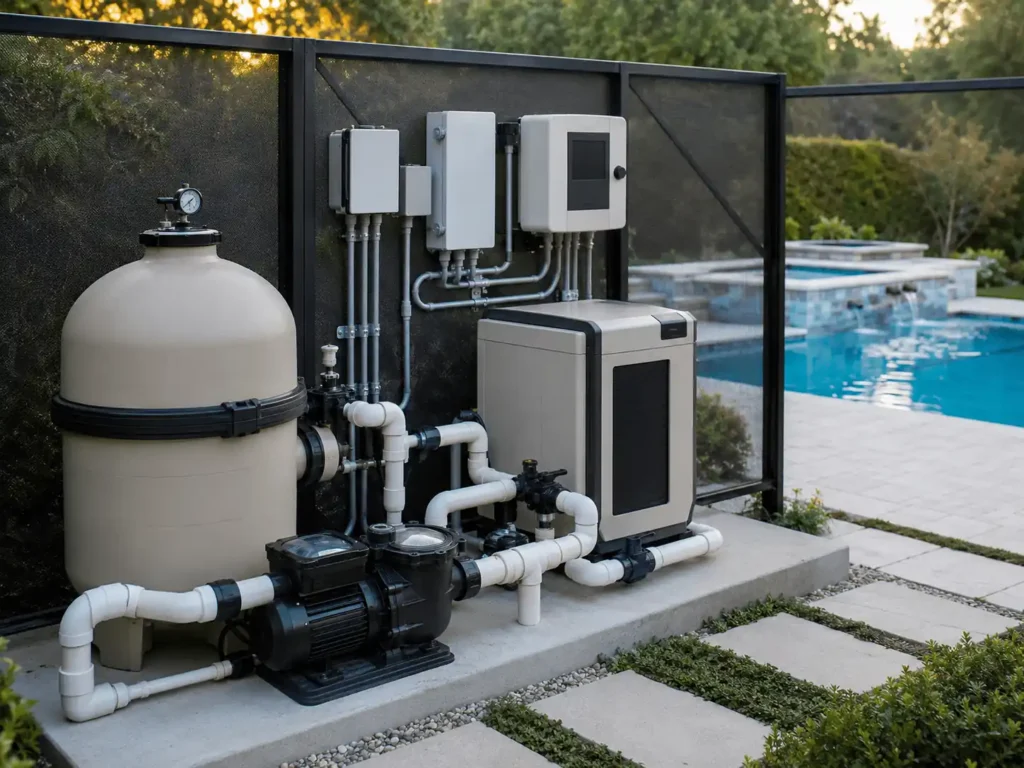
GWP Builders describes its pool construction as including an equipment pad ready for heaters, automation and salt. That kind of forward planning is the right model: leave space and utilities for what you want now and what you might add later, even if you do not install everything on day one.
Conduit, Plumbing and Power Come Before Finishes
Wiring and plumbing are easiest to run while the pool is under construction. Empty conduit between the pad and spots where you may add lighting, features or controls costs far less than trenching through finished decking. Valves, return lines and feature plumbing should also be laid out with automation in mind, so controllers have something to operate.
Electrical work and gas lines must follow local code and be done by appropriately licensed professionals, with permits as part of the process. Ask your builder who handles each trade and how the work is inspected.
Network Coverage at the Equipment Pad
Remote control depends on a reliable connection, and equipment pads are often at the far side of the house, behind block walls or inside enclosures that weaken Wi-Fi. A strong signal in the living room does not guarantee one at the pool equipment.
Ask whether the controller connects over Wi-Fi or a wired connection, where your router sits relative to the pad, and whether a network extender or a wired run makes sense. A little planning prevents an expensive system from dropping offline.
Efficiency: Pumps and Scheduling
The pump is a smart place to apply technology. ENERGY STAR explains on its pool pump page that a certified pool pump can run at different speeds and be programmed to match the pool’s operation to the appropriate speed. It adds that cutting pump speed by half lets the pump use only one-eighth as much energy, and that variable- and multi-speed pumps can cut energy costs, are typically quieter, and need less maintenance.
The U.S. Department of Energy’s Building America program also publishes a measure guideline on replacing single-speed pumps with variable-speed pumps, useful background if you are comparing equipment or upgrading an older pool. In a new custom pool, you can design the plumbing and controls around variable speeds from the start.
Scheduling lets you run the pump at lower speeds for routine circulation and higher speeds for cleaning, heating or features. The right schedule depends on your pool and equipment, so work it out with your builder.
Automation Does Not Replace Water Testing
Smart equipment can run a salt system, adjust circulation and send alerts, but water safety still depends on measuring it correctly. The Centers for Disease Control and Prevention recommends that owners keep pH between 7.0 and 7.8, keep chlorine at least 1 ppm (at least 2 ppm if stabilizer is used), and test chlorine and pH at least twice per day, more often with heavy use. It also notes that DPD test kits are more accurate than test strips.
Use automation to make the pool easier to manage, not as a reason to stop verifying chemistry. Even if your system includes monitoring, confirm readings with proper test kits.
New Design Versus Retrofit
Building automation into a new pool gives the cleanest result. Equipment can be sized and placed correctly, conduit is already in place, and plumbing is laid out so valves and features can be controlled. Retrofits are often possible, but they depend on what is already there: the pad layout, pump and heater compatibility, wiring access and network coverage.
If you are remodeling, start with an assessment of the existing equipment and plumbing. Some components may work with a new controller, while others may need replacement. GWP Builders’ custom pool design process includes feature integration, with water and fire features designed in from the start, which is the right moment to decide which features you also want on automation.
Questions to Ask Before You Choose
Ask how much equipment a system can control, whether it works with the pump and heater you are choosing, how it handles lighting and water features, and whether it can include your salt system if you plan one. Ask what happens if the network goes down, whether you can still operate the pool locally, and who will set up, test and walk you through the system. A system you understand is a system you will use.
Plan Equipment and Automation with GWP Builders
If you are designing a new pool or planning a remodel, equipment and automation decisions are best made alongside the layout, features and finishes. GWP Builders can talk through your goals and how the equipment pad, plumbing and controls fit into the design. Call (888) 515-4488 to start the conversation.
Key Points
- Plan automation during design so the pad, conduit, plumbing and network coverage are ready.
- Systems differ in what they control and monitor, so compare capabilities rather than assuming they match.
- Variable-speed pumps and scheduling are a natural place to apply smart control.
- Leave room on the pad for equipment you may add later, such as sanitation.
- Check connectivity at the equipment pad before relying on remote control.
- Keep testing your water with proper kits, whatever your system reports.
Frequently Asked Questions
When should I plan smart technology for a new pool?
Plan it during the design stage, before excavation. That is when the equipment pad, conduit, plumbing and network coverage can be laid out for automation without rework. You do not need to install every component immediately, but you should leave space and utilities for what you might add later.
Can I add automation to an existing pool?
Often, yes, though it depends on the equipment, plumbing and wiring already in place. An assessment of the pump, heater, controls and pad will show what is compatible and what needs replacing. Retrofits can involve more compromises than planning from the start.
Do all smart pool systems work the same way?
No. Systems differ in what they control, how deeply they monitor, and how they connect. Ask what a specific system can control, what it can only monitor, and whether it works with your chosen equipment.
Does a smart pool test the water for me?
Some systems may include sensors or monitoring, but you should still verify chemistry with proper test kits. Treat automation as a helper rather than a replacement for testing, and ask your builder or service provider how often to check.
Do I need Wi-Fi at the equipment pad?
For remote control and alerts on most connected systems, yes, you need a reliable connection there, wired or wireless. Equipment pads are often far from the router or behind walls, so check coverage early and plan a signal solution during design.